
Keep the Change- Retail Life After the Penny
What we know (as of November 3, 2025)
- Pennies are on the way out. The mint has been winding down production, but the pennies already in your drawer are still legal to use.
- There isn’t one national rule for rounding. Retailers are doing their best while waiting for clear federal guidance.
- Encourage credit card use by using signage
- our state’s rules come first. Some states require you to give exact change for cash. If that’s you, stick with exact change. If rounding is allowed, you can use the suggestions below.
Quick note: We’re sharing operational tips—not legal advice. Confirm your state’s requirements before making changes.
If rounding is permitted in your state: practical options
Scope: These suggestions apply only where state rules allow cash transaction rounding. Credit card transactions remain unchanged.
Cash-only rounding at checkout
- Rule: Round the final total (after discounts and tax) to the nearest $0.05 for cash payments only.
- Examples: $12.01-$12.02 ® $12.00; $12.03-$12.04 ® $12.05
- Customer note (receipt or sign) “Cash transactions rounded to the nearest $0.05”
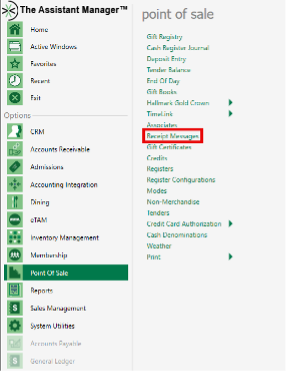
- Add a receipt message: TAM Office>POS>Receipt Messages
Penny float/micro variance
- Keep a small penny cup to handle ± $0.01-$0.02 differences on cash when needed
Adjust Retail Prices on a Few SKUs
- Price changes won’t likely help, once tax is added; But if a SKU frequently sells by itself and constantly causes a rounding issue, adjusting the price makes sense.
Donation Round Up (module required)
- Availability: Round up at the register is available if your organization is licensed for TAM Donations
- How it works by default: The system automatically suggests rounding the transaction to the next whole dollar (e.g., a $12.92 total suggests a $0.08 donation to reach $13.00)
- Customer-chosen amount- Shoppers can choose a different round-up amount. The cashier edits the donation amount on the prompt to any value the customer requests (e.g., the customer prefers $12.95- enter $0.03 instead of $0.08). It’s still processed as a Donation Round Up.
- Voluntary & separate: Round up is optional and separate from cash rounding policies. Use it whether your state requires exact change or allows cash rounding.
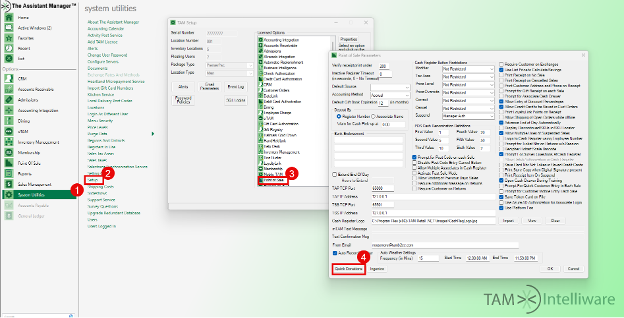
- Enable Donation Round up: TAM Office>System Utilities>Setup>Point of Sale>Quick Donations
Interested, but you don’t have the module?
Contact sales@tamb2cc.com to discuss adding Donations.
Operational guidance only; not legal advice. Confirm and follow your state’s rules before implementing changes.